Controller-first launcher to turn Android into console
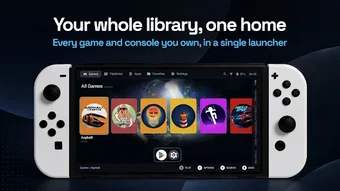
Console Home Launcher, by 100 GB Labs, is an Android personalization app that converts phones and handhelds into a controller-focused gaming shell. The launcher provides a landscape dashboard navigable with a gamepad and a single location to browse and launch installed titles. It emphasizes a lean-back, non-touchscreen workflow and quick access to frequently used apps. The tool targets Android gaming enthusiasts and owners of dedicated handheld consoles who want a dedicated, controller-driven home experience.
How does the launcher assemble a playable game library?
Console Home Launcher scans local storage for game files and enriches entries by fetching metadata from ScreenScraper.fr, producing box art, genre tags, and release dates. The scraper integration supplies high-resolution cover images and text descriptions so the library shows recognizable artwork. The app does not bundle games; users must point the launcher at installed APKs or ROM folders to populate the catalog.
How much control does it give over layout and organization?
Users can shape the home screen with tabs, collections, and pinned favorites, then choose shelf layouts such as grids or carousels for display. A quick-access dock holds frequently used apps and system controls. These layout tools let players create themed collections, pin preferred titles for instant access, and keep utilities reachable without interrupting a controller-driven session.
How does it handle emulation workflows and controller navigation?
Emulator integration is native: the launcher hands off titles directly to RetroArch and can notify when a required core is missing. Navigation is designed for D-pads and face buttons, enabling a zero-touchscreen experience on supported devices. The controller-first input model covers browsing, selection, and dock navigation so handhelds or external gamepads can operate the interface end-to-end.
Does it affect device performance or behave reliably at startup?
The interface is ad-free and positioned toward performance and stability, and the launcher targets handheld gaming devices such as specialized consoles. As a home-screen replacement it integrates with the system launcher flow, and community notes reference steady behavior during public beta testing. Those factors make it suitable for continuous use on dedicated gaming hardware, while general-phone behavior depends on device capabilities.
A practical pick for controller-focused handheld owners
Console Home Launcher is a solid option for Android handheld owners who want a controller-driven, console-style home experience. It does not include games, so users must supply their own titles and agree to make the launcher their default home screen. The app suits anyone aiming to centralize native and emulated games behind a single, non-touchscreen interface on handheld hardware.